


Overview
I like declarative frameworks and I find great value in services/tools like Dbt and Databricks Delta Live Tables (sorry, Lakeflow Declarative Pipelines) where I don’t really want to be fussed with needing to manage a schema definition for a table/view separately to the transformation logic or work out the dependencies of which table(s) need to load before others. Of course there are plenty of other options to create a framework for managing objects and data loading dependencies, off the shelf, roll your own. I like these tools.
And Microsoft thinks you like these tools too because as of July 2025 we now have Fabric Materialized Lake Views (MLV) (preview) in Lakehouses. MLVs allow you to write data transformation logic and Fabric will manage the rest: schema creation & data loading dependencies.
However, there’s been confusion around the various socials because the term Materialized View has existed for a good while now with each database vendor implementing their own definition. The benefits, vendors say, is that complex queries can be “materialised” physically in the database and therefore reduces the need for complex queries to keep running and crunching every time you want the results, taking valuable compute resources to do so. Although, in a lot of vendor implementations, the materialized view is updated automatically every time the source data changes…which uses up compute.
Here’s the official documentation:
Bas Land has also dived into MLVs in a great blog post here: Materialized Lake Views in Microsoft Fabric Lakehouse
What Are Fabric Materialized Views (MLVs) Anyway!?
Full disclosure, I don’t want to spend time parroting the official Microsoft documentation, you can read that in about 30 minutes (or less if you speed through) here. The word here is declarative and in a nutshell MLVs help you:
- Write a SQL query that defines the schema and data you want stored (e.g load data from source tables)
- Creates a dependency (DAG) automatically to process MLVs in the order they are referenced
- Ignore processing/running any MLVs where their source data hasn’t changed
- Add in Data Quality rules to ignore rows that fail constraint checks
In the real-world, MLVs would help when you write a bunch of SQL statements to load data from a source in Fabric (e.g. a Lakehouse containing raw data) and process/clean that data and load to a Silver layer, and beyond. At the moment functionality is limited in MLVs so don’t throw out your existing solutions at this point…please. Plus it’s in preview…
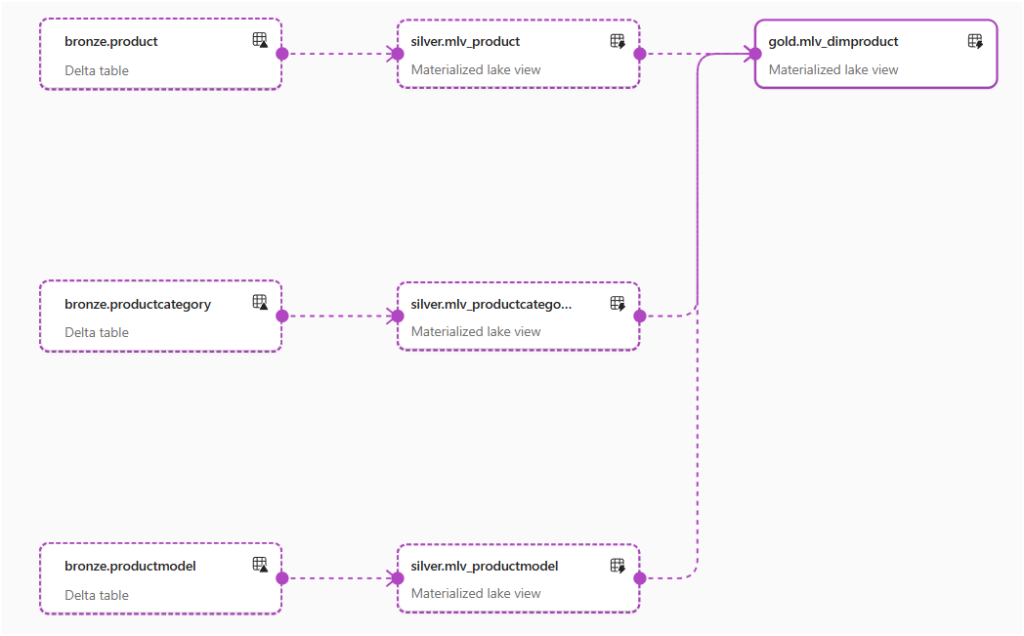
Here’s what basic lineage looks like with several MLVs in Fabric. The “Gold” table (MLV) won’t refresh until the “Silver” tables (MLVs) have refreshed.
Microsoft Tutorial
If you want to dive in using official Microsoft documentation there’s a Microsoft tutorial here that walks you through a medallion architecture example (Bronze, Silver etc).
Beta Framework for MLVs
That tutorial is exactly how I started, I jumped it and started writing SQL, defining the MLVs and seeing the data flow when I scheduled the refresh via the Fabric GUI (they will not refresh when the source data changes). But what I wanted to do is have a process that compiled, deployed, and managed the MLVs automatically while I concentrated on doing what I should be doing, the SQL transformations themselves. Isn’t that the whole point of these declarative services? I had a quick chat with Johnny Winter while starting to play around with some PySpark code to do just that.
The result is GenMLV and it’s on GitHub here, feel free to grab it and have a play.
Update: I’ve posted a video on using the GenMLV framework: https://youtu.be/Vanel4tge9o.
Functionality
What GenMLV does is manage the process of deploying, updating the definition, removing un-needed MLVs that you define in a basic folder structure. Each MLV is a .sql file that you write and add to a directory in a Fabric Lakehouse Files section…and yes, I’m trying to mirror what Dbt does but it’s very basic.
- Define a list of .sql files that contain the SQL transformation logic of the intended MLV
- The file name itself defines the MLV name and the schema it’s deployed to
- Manages a JSON file with file metadata in to track the .sql file properties, this is used to:
- Delete a .sql file and it will drop that MLVs that exist in the Lakehouse
- Re-deploy any MLVs where the .sql file “last modified” date has changed
- Drops/Creates the MLVs based on the .sql files.
Deployment and Usage
In a Fabric Workspace:
- Create a Notebook and add the code in the genmlv.py file (from here)
- Create a Lakehouse with schema enabled (preview only) if you don’t already have one. You’ll also need tables with data in the Lakehouse to work with.
- In the Lakehouse Files section, create a folder called mlv
- In this mlv folder you can create sub-folders e.g. 01, 02, 03 etc. This is because we can add .sql files to directories to run in sequence. E.G any .sql files in 01 need to be run before files in 02 folder etc. Unfortunately at this time MLVs don’t have any “ref” like functionality (Dbt etc)
NB: At the moment this process works with all data in a single Lakehouse, I’m continuing to test cross-lakehouse/cross-workspace lakehouse but MLV lineage is an issue currently, this is noted in the limitations of MLVs in Microsoft’s documentation.
Write the SQL Transforms
- Create a file with the schema and name of the MLV you want to create e.g. silver.mlv_product.sql
- The process will create schemas in the default lakehouse if they don’t already exist
- In this file, add the SQL transformation required to create the MLV. You must omit the CREATE MATERIALIZED LAKE VIEW as this is handled in the process. The format of the file must be:
[(
    CONSTRAINT constraint_name1 CHECK (condition expression1)[ON MISMATCH DROP | FAIL],
    CONSTRAINT constraint_name2 CHECK (condition expression2)[ON MISMATCH DROP | FAIL]
)]
[PARTITIONED BY (col1, col2, ... )]
[COMMENT “description or comment”]
[TBLPROPERTIES (“key1”=”val1”, “key2”=”val2”, ... )]
AS select_statement
A simple example would be:
COMMENT "Generated by GenMLV"
TBLPROPERTIES ("data_zone"="silver")
AS
SELECT
    *,
    now() as SilverLastUpdated
FROM Bronze.Product
Upload the .sql file to the mvl/01 directory:
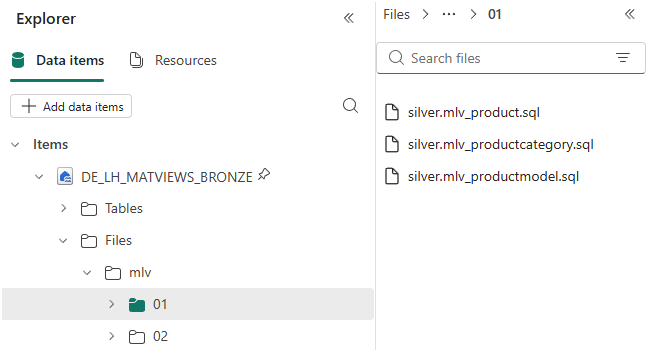
You can now run the Notebook cell with the genmlv logic, this will pick up the .sql file(s) and create the MLVs. You will also see the JSON metadata file appear in the mlv root folder.
In this example, I created 4 .sql files. 3 “silver” files I uploaded to 01 directory, 1 “gold” file I uploaded to 02 directory. This is because I need the silver MLVs created before the gold MLV.

Now that my MLVs have been created I can visualise the dependency, and schedule the MLVs to refresh. If I want to change the definition of an existing MLV, I can modify the relevant .sql file and run the Notebook again. If I want to delete an MLV, I just delete the relevant .sql file.
Conclusion
I started this alongside working through how to create MLVs as I thought “well, are we not supposed to concentrate on the transformation process and not about managing the MLVs themselves?” I’ll continue to work on the project, modularise it etc, and we’ll see how it and MLVs develop over time.
As always, please feel free to reach out to me here Andy Cutler | LinkedIn
References
- https://github.com/datahai/GenMLV
- Overview of Materialized Lake Views – Microsoft Fabric | Microsoft Learn
 Andy
Andy
I really look forward to seeing how this goes. I’m holding off trialling MLVs until they can do incremental refresh (and frankly, probably until both Schema LHs and MLVs are GA).
But I imagine I’ll want some kind of deployment wrapper when I do 🙂 Having sampled DBT, I’m not sure I like the way that’s going (commercially); a much lighter-weight solution like this seems to be a valuable niche.
Yes, I’m waiting for Lakehouse schemas to go GA…not sure what the hold up is.
Do MLVs include support for liquid clustering?
Yes the CLUSTER BY syntax works and the MLVs refresh successfully.