

This blog has been adapted from an earlier blog about using temp tables in Synapse Serverless SQL Pools. As the Fabric SQL engine is built from the Serverless SQL Pools engine (Polaris), the functionality is similar.
Temporary (temp) tables have been a feature of Microsoft SQL Server (and other database systems) for many years. Temp tables are supported within Fabric Lakehouse SQL Endpoints and Warehouses but there are caveats which we’ll walk through. We’ll see supported and unsupported scenarios and look at the limitations of temp tables within Fabric Warehouses.
Please note that as of 27th June 2023, temp tables in Fabric are not officially supported…I’ll be keeping my eye out for changes to that status.
Supported Features & Scenarios
Here is a summary table of scenarios for inserting, joining, and filtering using temp tables. We’ll be exploring the main insert and join scenarios in this blog post. The scenarios and code below are relevant for both Lakehouse SQL Endpoints and Warehouses.
| Feature | Supported |
| Create a local temp table | Yes |
| Create a global temp table | No |
| INSERT INTO #temptable VALUES(‘<value>’),(‘value’) | Yes |
| INSERT INTO #temptable SELECT FROM table | No |
| INSERT INTO #temptable EXEC storedprocedure | No |
| JOIN to table | No |
| JOIN to other temp tables | Yes |
| WHERE IN (SELECT FROM #temptable) | No |
Creating Temp Tables
When creating a temp table, only local temp tables are supported and run within the same query execution context. You are unable to create a temp table that can then be referenced by another process outside the current execution context.
Inserting Data into Temp Tables
After we have created a temp table, what are the options available to insert data into the temp table? Not all expected methods are supported.
Inserting Values
We can use a simple multi-value insert statement to insert values into a temp table.
--create temp table
CREATE TABLE #insertvalues
(
    rownum INT,
    textvalue VARCHAR(10)
);

--insert values
INSERT INTO #insertvalues(
    rownum,
    textvalue
)
VALUES  (1,'one'),
        (2,'two'),
        (3,'three'),
        (4,'Four');

--select from temp table
SELECT * FROM #insertvalues;
Inserting using SELECT from a Table
In this scenario we are not able to insert the results of a SELECT statement from a table. We receive the following error if we attempt this.
--create temp table
CREATE TABLE #webtelemetryaggregate
(
    EventType VARCHAR(20),
    EventCount INT
);

--insert from table
INSERT INTO #webtelemetryaggregate
(
    EventType,
    EventCount
)
SELECT
    EventType,
    COUNT(*)
FROM dbo.rawwebtelemetry
GROUP BY EventType;
Error:

Inserting using the results of an EXEC PROC Statement
Unlike Serverless SQL Pools, we are unable to use the results of an EXEC Stored Procedure statement to insert into a temp table.
--create proc
CREATE OR ALTER PROC dbo.InsertAggregateResults
AS
BEGIN
    SELECT
        EventType,
        COUNT(*)
    FROM dbo.rawwebtelemetry
    GROUP BY EventType;
END;

--create temp table
CREATE TABLE #webtelemetryaggregate
(
    EventType VARCHAR(20),
    EventCount INT
);

--insert from table
INSERT INTO #webtelemetryaggregate
EXEC dbo.InsertAggregateResults;
Error:

Joining Temp Tables
Once we have data within a temp table, what can we do with it? Can we join to other Fabric objects? The following section shows that we are limited in scope to joining temp tables.
Joining Temp Tables with Fabric tables
When attempting to join a temp table with other Fabric objects such as tables we are unable to do so.
--create temp table
CREATE TABLE #dimeventtype
(
    EventType VARCHAR(20),
    EventTypeDescription VARCHAR(50)
);

INSERT INTO #dimeventtype
VALUES ('putinbasket','Put In Basket'),
       ('purchasedproduct','Purchased Product'),
       ('browseproduct','Browse Product Page')

--join and aggregate
SELECT
    tmp.EventTypeDescription,
    COUNT(f.UserID) AS EventCount
FROM dbo.rawwebtelemetry f
INNER JOIN #dimeventtype tmp ON tmp.EventType COLLATE Latin1_General_100_BIN2_UTF8 = f.EventType
GROUP BY tmp.EventTypeDescription;
Error:

FYI I needed to use COLLATE in the join query as the collation for a Lakehouse and Warehouse is set to Latin1_General_100_BIN2_UTF8. An error is raised if you try and create a temp table and specify a column collation.
Joining Temp Tables Together
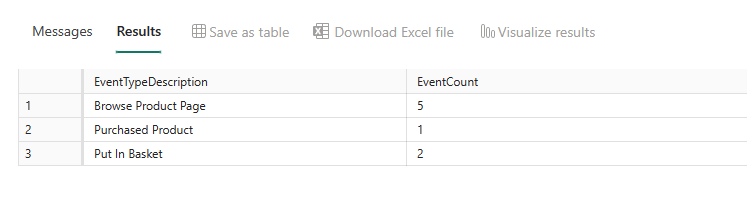
However, we are able to join a temp table to another temp table. Let’s use the wrapper SELECT stored procedure from earlier and join to another temp table.
--create temp table
CREATE TABLE #dimeventtype
(
    EventType VARCHAR(20),
    EventTypeDescription VARCHAR(50)
);

INSERT INTO #dimeventtype
VALUES ('putinbasket','Put In Basket'),
       ('purchasedproduct','Purchased Product'),
       ('browseproduct','Browse Product Page');

CREATE TABLE #webtelemetry
(
    EventType VARCHAR(20),
    UserID INT
);

INSERT INTO #webtelemetry
VALUES ('browseproduct',1),
        ('browseproduct',2),
        ('browseproduct',3),
        ('browseproduct',4),
        ('browseproduct',5),
        ('putinbasket',1),
        ('putinbasket',2),
        ('purchasedproduct',1);

--join and aggregate
SELECT
    tmp.EventTypeDescription,
    COUNT(f.UserID) AS EventCount
FROM #webtelemetry f
INNER JOIN #dimeventtype tmp ON tmp.EventType = f.EventType
GROUP BY tmp.EventTypeDescription;
Results:
Conclusion
Although temp tables are supported within Fabric, just like Synapse Analytics Serverless SQL Pools, their usage is limited and there are caveats around being able to insert data and also join temp tables. Perhaps temp tables may be useful for situations where a small dataset needs holding to provide looping logic, or to hold a small dataset for reporting purposes.
References
- https://docs.microsoft.com/en-us/azure/synapse-analytics/sql/develop-tables-temporary
- https://stackoverflow.com/questions/66833137/how-to-select-from-or-store-result-of-sp-describe-first-result-set
 Andy
Andy